
How to Make Your Computer Load Faster Using Software: 7+ Proven Fixes. Waiting for your PC to boot up can be one of the most frustrating experiences of your digital life, especially when you are racing against a deadline or trying to jump straight into work.
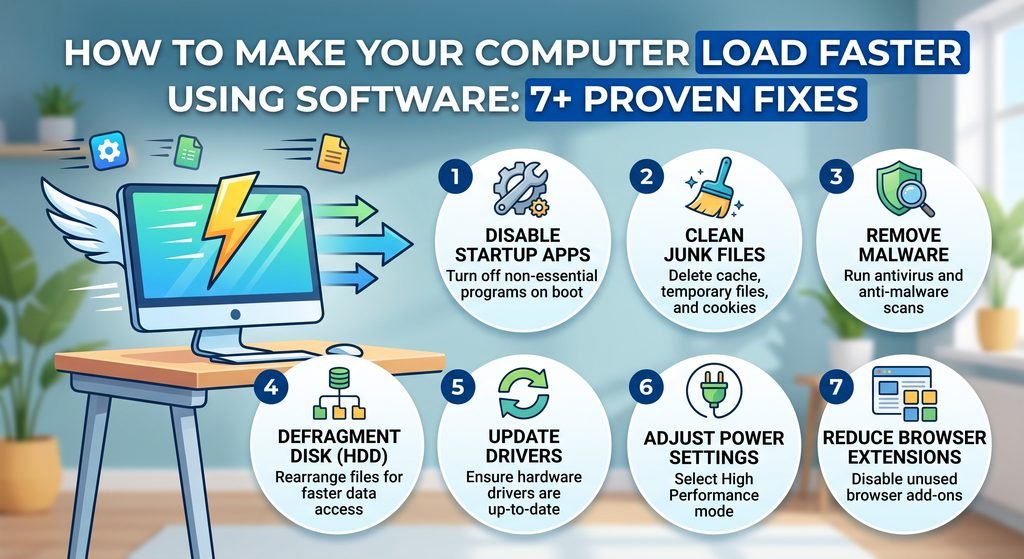
Over time, as you install new applications, download files, and complete system updates, your machine inevitably starts to lose its initial speed and responsiveness. Fortunately, hardware upgrades like buying a new SSD or expanding your RAM are not always necessary.
Learning how to make your computer load faster using software allows you to strip away digital clutter, optimize background processes, and reclaim the snappy performance your system had when it was brand new without spending a single dime.
Why Is Your Computer Loading So Slowly?
To understand how to make your computer load faster using software, you first need to recognize the invisible processes running under the hood every time you turn on your machine. When an operating system boots up, it does not just launch the desktop interface; it simultaneously initializes dozens of background services, startup applications, and hardware drivers.
Over months or years of use, newly installed software often configures itself to launch automatically upon boot without your explicit permission, creating a massive bottleneck for your central processing unit (CPU) and storage drive.
How to Make Your Computer Load Faster
Beyond rogue startup applications, software-driven slowdowns frequently stem from accumulated system clutter, fragmented registries (on traditional hard drives), and outdated device drivers. When your system drive runs low on free space, the operating system struggles to create virtual memory pages, causing execution times to stretch exponentially.
Additionally, subtle forms of adware or bloatware—often bundled with free applications—can quietly consume system resources in the background. Address these software issues systematically, and your computer can load significantly faster while maintaining system stability.
| Common Software Slowdown Cause | System Impact | Recommended Software Solution |
| Excessive Startup Programs | High CPU & Disk usage during boot | Task Manager / Autoruns |
| Accumulated Temp Files | Storage bottleneck & slow pagefiles | Windows Storage Sense / CCleaner |
| Outdated System Drivers | Hardware-software communication lag | Device Manager / Official Manufacturer Utility |
| Background Bloatware | Continuous RAM & CPU consumption | Malwarebytes / Windows Settings App Cleanup |